
Neues Feature
GuideClarity chattet jetzt in vielen Sprachen
Der Chat mit Clarity funktioniert jetzt in vielen Sprachen, unabhängig davon, ob die Oberfläche auf Deutsch oder Englisch eingestellt ist. Du tippst in Deiner Sprache, Clarity antwortet in Deiner Sprache, und das unabhängig von der Menüführung, die bei Deutsch oder Englisch (UK/US) bleibt.
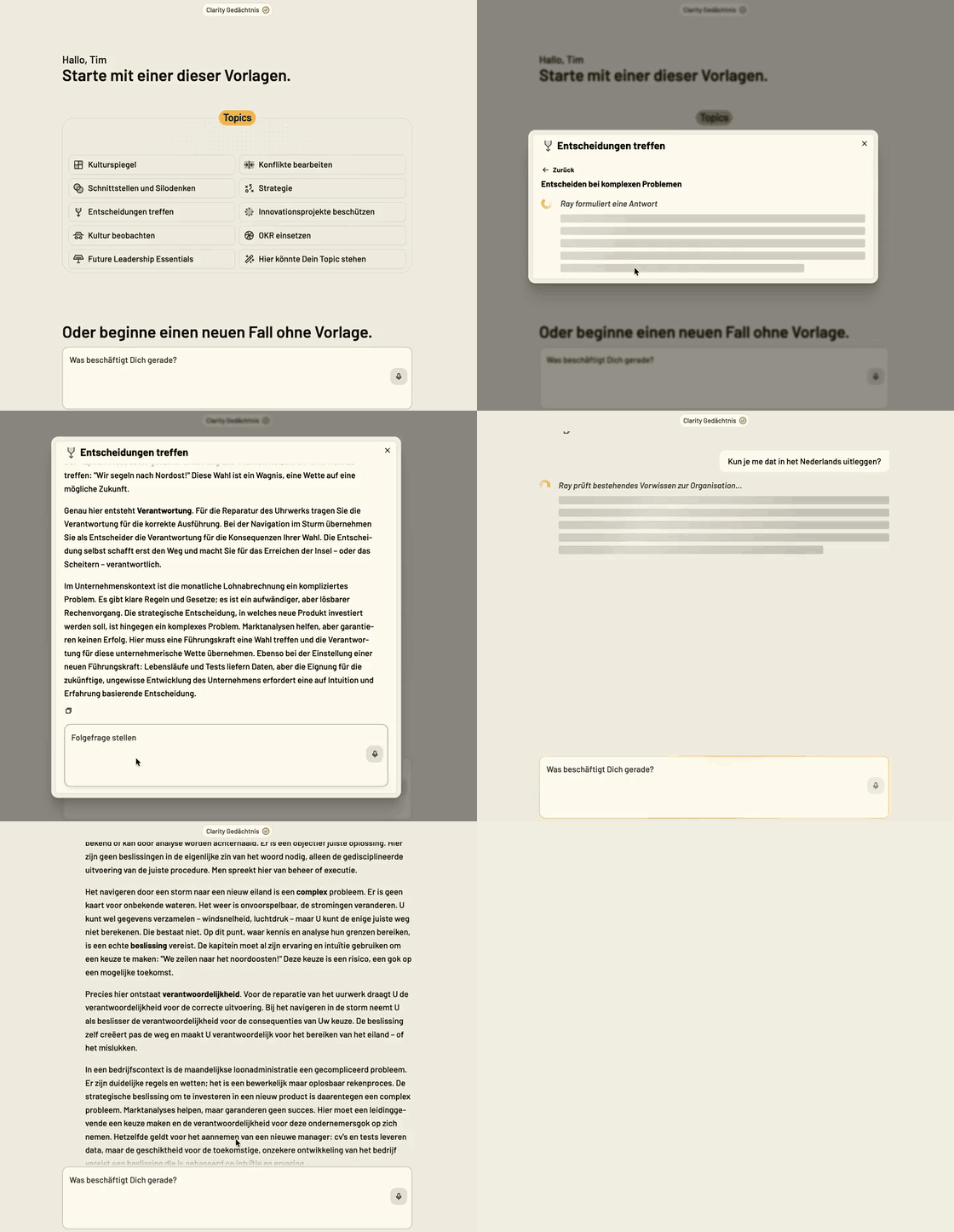
So sieht das in der Praxis aus
Camille arbeitet im Pariser Büro eines deutschen Kunden, hat die Oberfläche auf Englisch gestellt, schreibt im Chat aber lieber auf Französisch. Clarity antwortet ihr auf Französisch, während ihr Kollege Ben im selben Team auf Englisch chattet, ohne dass irgendwer etwas umstellen musste.
Weitere Updates in dieser Ausgabe
Neues Feature
GuideSo werden aus einzelnen Gesprächen geteilte Beobachtungen
Jede »Beobachtung« ist ein einzelnes Muster, das Clarity aus einem echten Gespräch herausliest, keine Umfrageaussage. Viele Beobachtungen zusammen ergeben das Bild der gemeinsamen Organisationskultur, das Clarity in jedes weitere Gespräch mitdenkt.
Anwendungsfall
Wenn drei verschiedene Nutzer unabhängig voneinander beschreiben, dass Entscheidungen in ihrer Organisation oft vertagt werden, hält Clarity das als eine Beobachtung fest, die ab sofort in jedes weitere Gespräch einfließt.
Neues Feature
GuideDie zehn Faktoren, auf die es in Schutzräumen ankommt
Das Insight »Erfolgsfaktoren von Schutzraumprojekten« zeigt die zehn Faktoren, auf die es in Schutzraumprojekten wirklich ankommt.
Anwendungsfall
Jemand startet ein Innovationsprojekt und chattet mit dem Insight über die Schutzraum-Faktoren. Clarity zeigt, welche Bedingungen noch fehlen und wie man sie schafft.
Verbessertes Feature
GuideJeder Chat bekommt automatisch einen passenden Titel
Clarity vergibt für jeden neuen Chat automatisch einen passenden Titel, der den Inhalt auf einen Blick erkennbar macht. Über »umbenennen« lässt sich der Titel jederzeit neu generieren.
Anwendungsfall
Petra hat in den letzten zwei Wochen zwölf Chats zu unterschiedlichen Themen geführt. Früher hießen die alle »Chat vom 3.7.«, jetzt sieht sie auf einen Blick, worum es in jedem einzelnen ging.
Alle Features jetzt live in Clarity
Probiere die neuen Funktionen direkt aus – melde dich an und leg los.
Clarity öffnen